September 30, 2026
A Framework for System Design Interviews
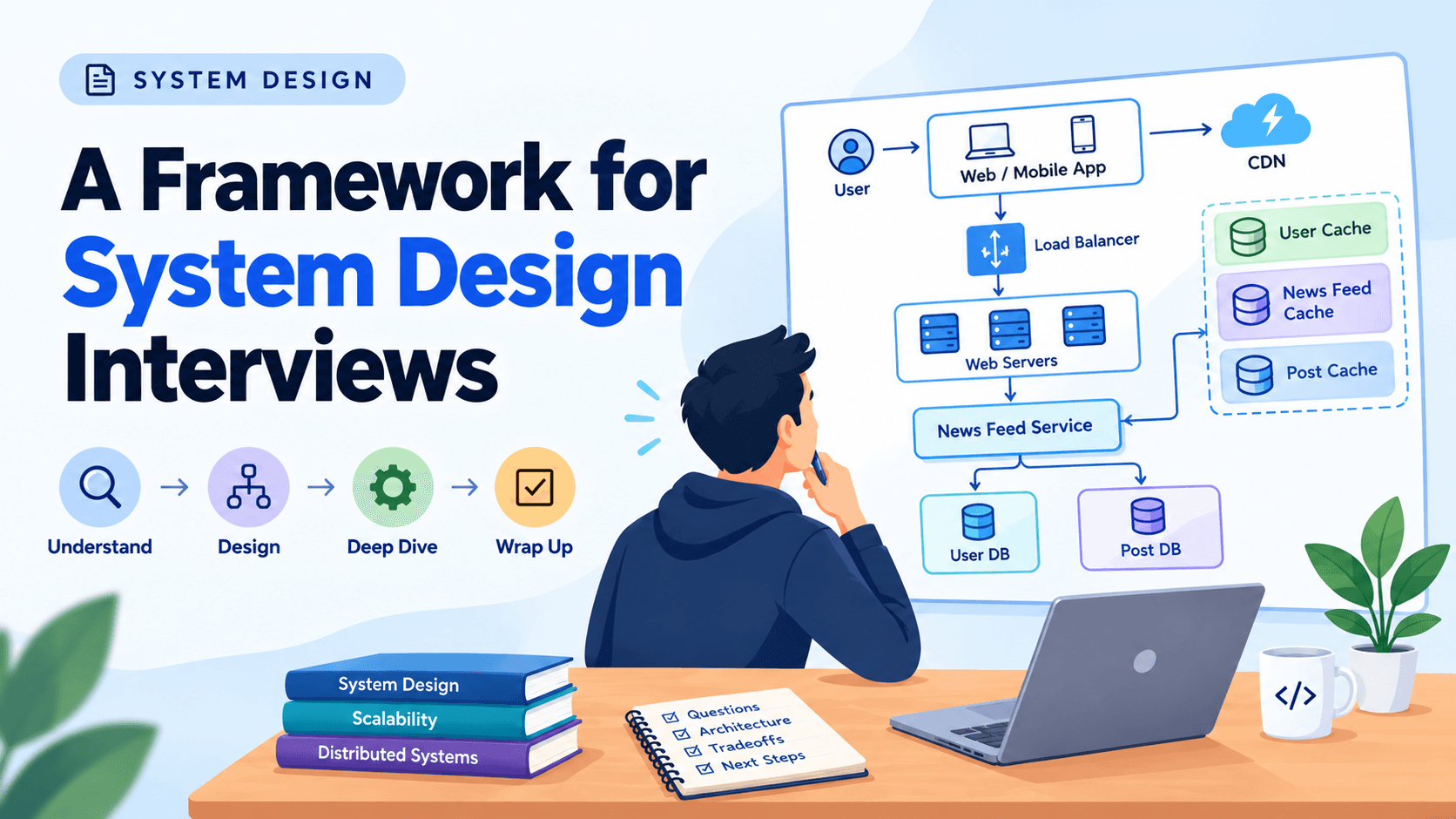
System design interviews are an important part of software engineering interviews, especially for backend and senior engineering positions. They help interviewers understand how candidates approach complex problems, make technical decisions, and design scalable applications.
For beginners, system design interviews can feel overwhelming. You might be asked to design something like Facebook, WhatsApp or YouTube, even though these applications require thousands of engineers and complex infrastructure.
But here is the good news, you are not expected to design an entire real-world application in one interview.
Instead, the goal is to demonstrate your problem-solving approach, understand the requirements and develop a reasonable solution step by step.
In this guide, we will explore a simple four step framework for approaching system design interviews, with practical examples to help beginners understand each stage.
What Is a System Design Interview?
A system design interview is a technical discussion where you are asked to design an application or software system based on specific requirements.
For example, an interviewer might ask:
"How would you design a social media news feed?"
This question does not have one perfect answer. You need to understand what the application should do, identify its major components and explain how they work together.
The interviewer is not only interested in your technical knowledge. They also want to understand how you communicate, handle unclear requirements, explain your decisions and respond to feedback.
In simple words, a system design interview tests how you think like a software engineer rather than how quickly you can provide an answer.
Why Is a Framework Important?
System design problems are usually open-ended. Without a clear approach, it is easy to jump between different technologies and lose track of the actual problem.
For example, if someone asks you to design a food delivery application, you might immediately think about using Kubernetes, Redis, Kafka, and microservices.
However, you have not even established whether the application needs live delivery tracking or online payments.
This is why following a structured approach is important.
A simple framework helps you organize your thoughts, manage interview time, and communicate your design clearly.
The Four-Step Framework for System Design Interviews
A typical system design interview can be divided into four major steps:
Understand the problem and establish the design scope.
Propose a high-level design.
Perform a design deep dive.
Wrap up and discuss improvements.
Let's understand each step using a practical example of designing a news feed system.
Step 1: Understand the Problem and Establish Design Scope
The first step is understanding exactly what you are supposed to build.
Imagine the interviewer asks:
"Design a news feed system like Facebook."
Instead of immediately drawing an architecture diagram, take some time to understand the requirements.
Think about building a house. Before starting construction, you need to know how many rooms are required, how much space is available, and what the owner expects.
Software systems work in the same way.
Ask Clarifying Questions
You should ask questions that help you understand the application's functionality and expected scale.
For example:
Is the application for web, mobile, or both?
Can users create posts?
Can users see posts from their friends?
Should posts be displayed by time or relevance?
How many users are expected?
Can posts contain images and videos?
These questions help establish the design scope.
Understand Functional Requirements
Functional requirements describe what the application should do.
For a news feed application, the main requirements might include:
Users can create posts
Users can follow or connect with other users
Users can view their friends' posts
Posts are displayed in reverse chronological order
For example, when John publishes a new post, his friends should be able to see it in their news feeds.
Understand Non-Functional Requirements
Non-functional requirements describe how the application should perform.
Examples include:
The application should support millions of users
Users should receive responses quickly
The system should remain available
The application should handle increasing traffic
For example, if 10 million users access the application daily, the system should be designed to handle that workload.
Define the Design Scope
You do not need to design every feature of Facebook during one interview.
For our example, we can initially focus on two main features:
Publishing posts
Retrieving news feeds
Other features, such as messaging, advertisements, and video calling, can remain outside the initial scope.
The main takeaway: Never start designing a system before understanding its requirements and boundaries.
Step 2: Propose a High-Level Design
Once you understand the requirements, the next step is to create a high-level architecture.
High-level design identifies the major components of a system and explains how they communicate with each other.
You do not need to explain every technical detail at this stage.
For our news feed application, a simple architecture might look like this:
User → Web/Mobile Application → Load Balancer → Web Servers → News Feed Service → Cache/Database
Let's understand these components.
1. Client Application
The client is the application users interact with.
Examples include a web browser or mobile application.
When a user opens Facebook and requests their news feed, the client sends an HTTP request to the backend.
2. Load Balancer
A load balancer distributes incoming requests across multiple available servers.
Imagine your application has three web servers. Instead of sending every request to one server, the load balancer distributes traffic among them.
This helps prevent a single server from becoming overloaded.
3. Web Servers
Web servers receive incoming requests and communicate with backend services.
For example, when a user requests their news feed, the web server receives the request and forwards it to the appropriate service.
4. Cache
A cache stores frequently accessed data so that the application can retrieve it quickly.
For example, instead of repeatedly retrieving the same news feed information from a database, the system can temporarily store prepared feed data in a cache.
Redis is one example of a technology used for caching.
5. Database
The database stores persistent information.
For a news feed application, this might include user information, posts, and relationships between users.
Unlike a typical cache, the database is intended to retain information for long-term use.
Draw the Architecture
During an interview, you should draw a simple architecture diagram to communicate your approach.
Start with the main components and gradually explain how they interact.
You can also discuss your initial design with the interviewer and ask for feedback.
The main takeaway: Start with a simple architecture. Avoid introducing unnecessary complexity before understanding what the system actually needs.
Step 3: Perform a Design Deep Dive
After agreeing on the high-level design, the next step is to explore important components in greater detail.
This is called the design deep dive.
At this stage, you should explain how different components work internally, how data moves through the system, and how important operations are handled.
For example, let's understand how a news feed is retrieved.
How Does a News Feed System Work?
Imagine you open Facebook and click the Home button.
The application needs to retrieve your news feed.
A simplified request flow looks like this:
The user requests their news feed
The load balancer forwards the request to an available web server
The web server checks authentication and applies rate limiting
The News Feed Service receives the request
The service checks whether the prepared feed exists in the cache
If the required information is unavailable, the service retrieves it from the database
The application returns the prepared news feed to the user
This is a simplified explanation of the retrieval process
Understanding Authentication
Authentication verifies the identity of a user.
For example, when you log in to an application, the backend checks your credentials or authentication token before allowing access to protected resources.
Without proper authentication, unauthorized users might access private information.
Understanding Rate Limiting
Rate limiting controls how frequently users can send requests to an API.
For example, imagine an API allows 100 requests per minute.
If a user sends thousands of requests within a short period, the system can restrict excessive requests.
This helps protect the application from abuse and unnecessary resource consumption.
Understanding Different Caches
In a large news feed system, different types of caches can serve different purposes.
User Cache: Stores frequently accessed user-related information.
News Feed Cache: Stores prepared news feed information for faster retrieval.
Post Cache: Stores frequently accessed post information.
For example, if multiple users request the same popular post, the application may retrieve it from the post cache instead of repeatedly querying the database.
What Happens When Cache Data Is Missing?
This situation is called a cache miss.
For example, suppose a user requests a news feed, but the required feed information is not available in the cache.
The application may retrieve the necessary information from the database, prepare the response, and store the result in the cache for future requests.
When the required information already exists in the cache, it is called a cache hit.
Understanding these concepts helps you explain why caching is useful in large-scale applications.
Discuss Important Components First
You do not need to explore every component in the same level of detail.
Focus on the components that are most important to the problem.
For example:
In a URL shortener, discuss how short codes are generated
In a messaging application, discuss message delivery and online/offline status
In a news feed system, discuss feed generation and retrieval
The main takeaway is to focus on important technical decisions instead of spending too much time on unnecessary details.
Step 4: Wrap Up and Discuss Improvements
The final step is to review your design and discuss possible improvements.
Remember, no system design is perfect.
There are always potential bottlenecks, failures, and opportunities for improvement.
For example, imagine your news feed application initially supports 100,000 users.
Over time, the application grows to 10 million users.
Your original architecture might not be sufficient anymore.
You should think about how the system can handle this growth.
Discuss Scalability
Scalability means the ability of a system to handle increasing workloads.
For example, if one backend server cannot handle the incoming traffic, you might add more servers and distribute requests through a load balancer.
You could also improve caching and database capacity.
Discuss Failure Handling
What happens if one of your web servers crashes?
A load balancer can stop directing new requests to the unhealthy server and use the remaining healthy servers.
What happens if the database becomes unavailable?
You should discuss how the system detects the failure, protects data, and recovers.
Discuss Monitoring
Monitoring helps engineers understand the health and performance of an application.
Some useful metrics include:
CPU and memory utilization
API response time
Error rate
Database performance
Cache hit rate
Server availability
For example, if API response time suddenly increases, monitoring helps identify potential problems.
Discuss Future Improvements
You can also discuss improvements that might be useful as the application grows.
For example:
Database indexing
Caching optimization
Database replication
Better failure recovery
Improved monitoring
Separating services based on responsibilities
You should explain why an improvement is needed rather than simply listing technologies.
The main takeaway: A good system design discussion does not end after drawing the architecture. You should also understand its limitations and possible improvements.
Important Best Practices for System Design Interviews
Following the four-step framework is important, but how you communicate your ideas also matters.
Here are some useful practices to remember.
1. Ask Questions Before Designing
Do not assume that you understand the problem completely.
Ask clarifying questions and establish reasonable assumptions.
2. Start with High-Level Design
Identify the major components first.
Once the overall architecture is clear, gradually explore the important technical details.
3. Communicate Your Thinking
Do not remain silent while solving the problem.
Explain why you choose a particular approach and invite feedback from the interviewer.
4. Avoid Over-Engineering
Using more technologies does not automatically make an architecture better.
For example, a small application might work perfectly with a single backend service and a database.
Introducing multiple microservices, message queues, and complex infrastructure without a clear requirement can increase development and operational costs.
5. Discuss Tradeoffs
Different solutions have different advantages and disadvantages.
For example, caching can improve response times, but it also introduces challenges such as data consistency and cache invalidation.
Understanding these tradeoffs demonstrates practical engineering thinking.
6. Manage Your Time
A typical 45-minute interview can be divided approximately as follows:
Interview StageSuggested TimeUnderstand requirements 3–10 minutesHigh-level design10–15 minutesDesign deep dive10–25 minutesWrap up3–5 minutesThese are approximate guidelines. The actual time depends on the problem and the interviewer's expectations.
A Practical Example: Designing a URL Shortener
Let's apply the four step framework to another familiar application.
Imagine the interviewer asks:
"Design a URL shortener like Bitly."
A URL shortener converts a long URL into a short URL.
For example:
Original URL:
https://example.com/products/electronics/mobile-phones
Short URL:
short.ly/abc123
Step 1: Understand the Requirements
Ask questions:
Can users create short URLs?
Should short URLs redirect to the original URLs?
Should URLs expire?
Do we need to track clicks?
Suppose the requirements are simple: users can create short URLs, access the original URLs, and track the number of clicks.
Step 2: Create the High-Level Design
Identify the major components:
User → Backend API → Cache → Database
The backend handles URL creation and redirection, while the cache and database help retrieve the original URLs.
Step 3: Explore the Main Operations
When a user submits a long URL, the backend generates a unique short code and stores the mapping in the database.
For example:
Short Code Original URLabc123 https://example.com
xyz789 https://google.com
When someone visits short.ly/abc123, the backend looks up the corresponding original URL and redirects the user.
The system can first check the cache and retrieve the mapping from the database if it is not available.
Step 4: Discuss Improvements
Now think about potential problems:
How do we prevent duplicate short codes?
What happens if Redis becomes unavailable?
How can the system handle millions of requests?
How do we track clicks efficiently?
How do we monitor performance?
This simple example demonstrates how the four-step framework can be applied to different system design problems.
Conclusion
System design interviews are not about memorizing complicated architecture diagrams or using every technology available.
They are about understanding problems, identifying requirements, developing reasonable solutions and explaining your technical decisions.
The four step framework provides a simple approach:
Understand the problem, propose a high-level design, explore important components and discuss possible improvements.
By practicing this approach with familiar applications such as URL shorteners, news feeds, messaging platforms, and e-commerce systems, you can gradually develop the confidence needed to solve more complex system design problems.
Remember, a good system design starts with asking the right questions, not choosing the right technology.