August 17, 2026
AWS Load Balancing and Auto Scaling Group(ASG)
Have you ever wondered how websites like Amazon, Netflix, or Facebook continue serving millions of users even when traffic suddenly increases?
Imagine thousands of people trying to enter a shopping mall through a single entrance. The result would be chaos long lines, frustration, and eventually people leaving.
Web applications face exactly the same problem. If all requests go to one server, sooner or later that server becomes overloaded. This is where Load Balancers and Auto Scaling Groups (ASGs) become essential. In this article, I will explain these concepts using simple examples, diagrams, and real AWS architecture.
What is Load Balancing?
Load balancing is the process of distributing incoming traffic across multiple servers instead of sending every request to a single server.
Think of it like a receptionist in a hospital. Patients arrive continuously. Instead of sending everyone to one doctor, the receptionist checks which doctor is available and directs each patient accordingly. A Load Balancer works the same way. Instead of one server doing all the work, multiple servers share the workload.Without Load Balancing
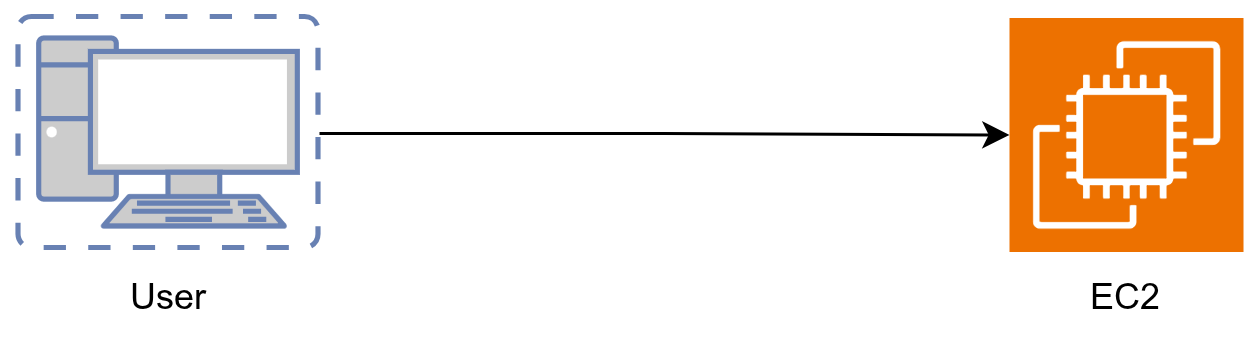
Every request reaches the same server. If the traffic increases then
- CPU becomes high
- Memory usage increases
- Response time becomes slow
- Eventually the server crashes
With Load Balancing
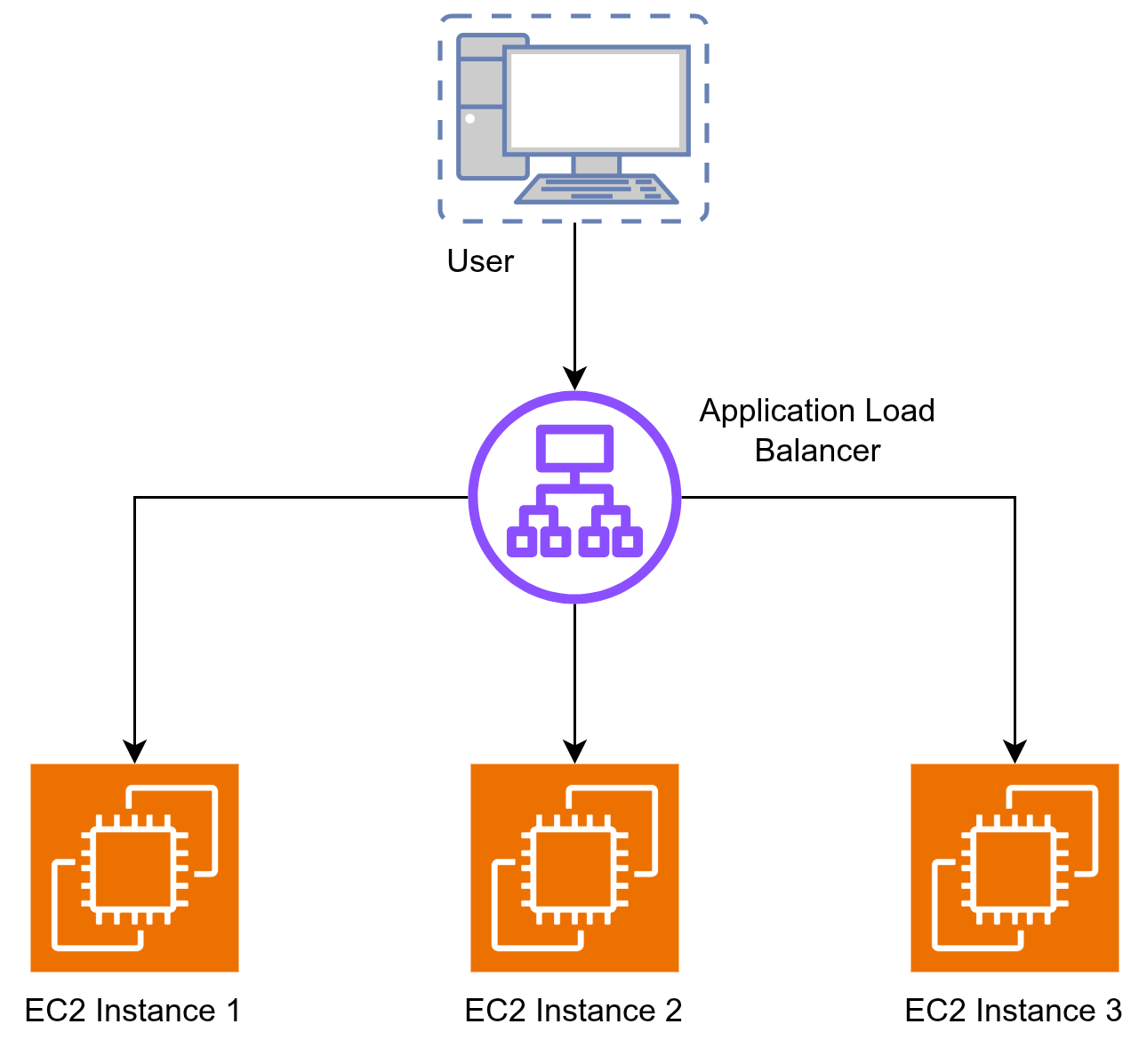
The Load Balancer distributes traffic evenly across all available servers. Instead of one server handling 300 requests per second, three servers might each handle only 100 requests.
Why Do We Need a Load Balancer?
- High Availability
- Better Performance
- Fault Tolerance
- Easy Scaling
High Availability
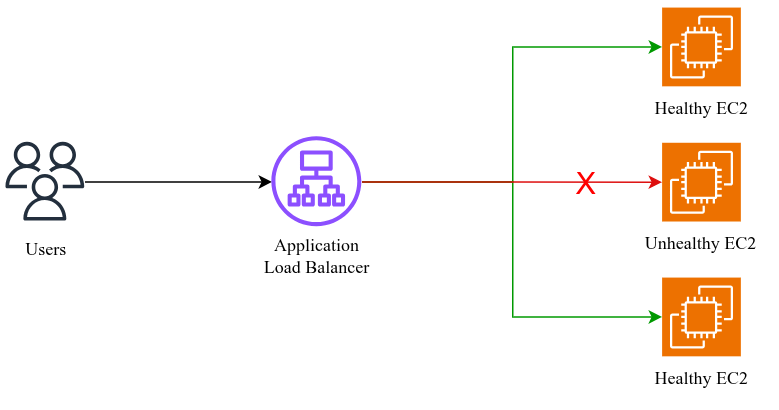
Suppose, one EC2 instances crashes without load balancer, your application becomes unavailable. But with a load balancer traffic goes automatically to the healthy instances. Users usually do not even notice that one server failed.
Better Performance
Instead of overloading one machine, multiple machines share the workloads. This reduces latency and improves reponse time of the server.
Fault Tolerance
AWS continuously performs health checks. If an instance becomes unhealthy, the load balancer stops sending traffic to it.
Types of AWS Load Balancers
AWS provides four different types of Load Balancers.
- Application Load Balancer (ALB)
- Network Load Balancer (NLB)
- Gateway Load Balancer (GWLB)
- Classic Load Balancer (CLB)
Application Load Balancer
An Application Load Balancer is mainly used for web applications and APIs that use HTTP or HTTPS. It can understand the request and make decisions based on things like the URL path or domain name. For example, requests to /api can go to one group of servers while requests to /images go to another group.
-> ALB is like a smart traffic controller for websites and APIs.
Network Load Balancer
A Network Load Balancer is designed for applications that need very high performance and low latency. It works at the network level and is commonly used for TCP, UDP, and other high-performance workloads. If your application needs to handle a huge amount of traffic while keeping network latency very low, NLB is a good choice.
-> NLB is like a very fast traffic distributor for network connections.
Gateway Load Balancer
A Gateway Load Balancer is different from ALB and NLB. It is mainly used to deploy and scale network security appliances, such as firewalls and intrusion detection systems. It helps route network traffic through these security appliances before the traffic reaches the application.
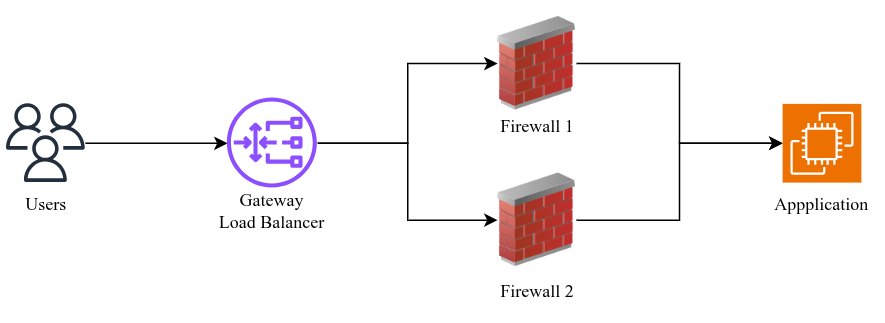
-> GWLB is like a security checkpoint that sends traffic through firewalls or security appliances.
Classic Load Balancer
Classic Load Balancer is the older generation of AWS Load Balancing. It can distribute basic HTTP/HTTPS and TCP traffic, but it does not provide many of the advanced features available with ALB and NLB. For new applications, AWS generally recommends using ALB or NLB instead.
-> CLB is the older generation of AWS Load Balancer, mainly relevant when working with existing legacy applications.
What is Auto Scaling Group (ASG)?
Auto Scaling Group is an AWS service that automatically launches or terminates EC2 instances based on traffic or defined policies. Instead of manually creating EC2 instances every time traffic increases.
Think of ASG as a smart manager. If customers suddenly arrive, the manager hires more employees. When customers leave, the manager sends extra employees home. Exactly the same concept.
Important ASG Components
- Launch Template: A Launch Template defines how AWS should create new EC2 instances. It contains settings such as the AMI, instance type, security group, key pair, storage, and user data. When the Auto Scaling Group needs a new server, it uses this template to launch it.
- Minumum Capacity: Minimum Capacity defines the minimum number of EC2 instances that should always be running in the Auto Scaling Group. For example, if the minimum capacity is set to 2, ASG will try to keep at least two instances running.
- Desired Capacity: Desired Capacity defines the normal number of EC2 instances you want your application to have. For example, if the desired capacity is 3, ASG will normally maintain three EC2 instances unless a scaling event changes the required capacity.
- Maximum Capacity: Maximum Capacity sets the maximum number of EC2 instances that the Auto Scaling Group can launch. For example, if the maximum capacity is 10, ASG can automatically scale your application up to ten instances during high traffic.
- Scaling Policy: Scaling Policies tell the Auto Scaling Group when and how to add or remove EC2 instances. For example, you can configure a policy to add more instances when CPU utilization becomes high and remove instances when traffic decreases.
- Health Check: Health Checks help the Auto Scaling Group identify unhealthy EC2 instances. If an instance fails its health check, ASG can automatically terminate it and launch a replacement instance to maintain the required capacity.
- Availability Zones: An ASG can distribute EC2 instances across multiple Availability Zones. This improves high availability and fault tolerance, because your application can continue running even if one Availability Zone experiences a problem.
Real World Example
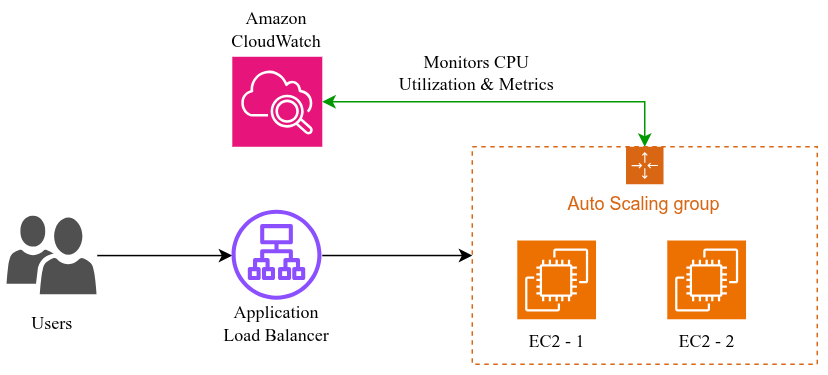
Imagine you are running an online shopping website where 2 EC2 instances are enough on a normal day. During Black Friday, traffic suddenly increases, so CloudWatch detects the higher load and the Auto Scaling Group (ASG) launches additional EC2 instances. The Load Balancer then distributes customer requests across the new instances. When the sale ends and traffic drops, ASG removes the extra instances, helping maintain performance while keeping AWS infrastructure costs under control.
The example is illustrated across three scenarios, as shown in the diagram below.
Scenario - 1
Scenario - 2
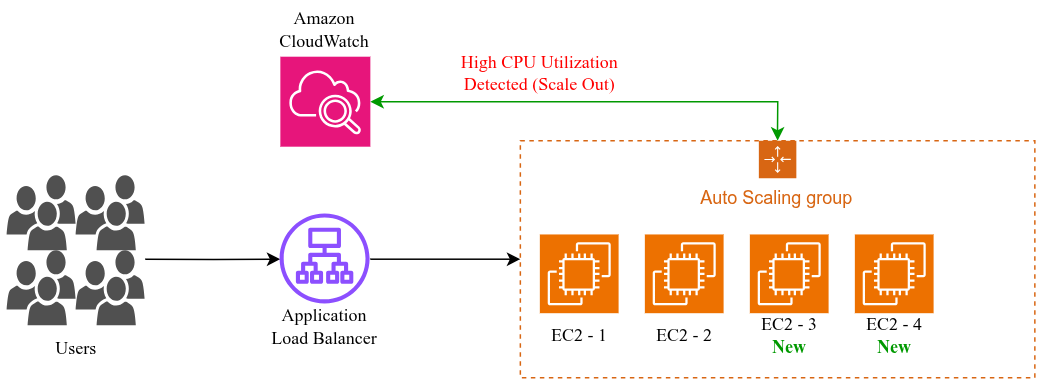
Scenario - 3
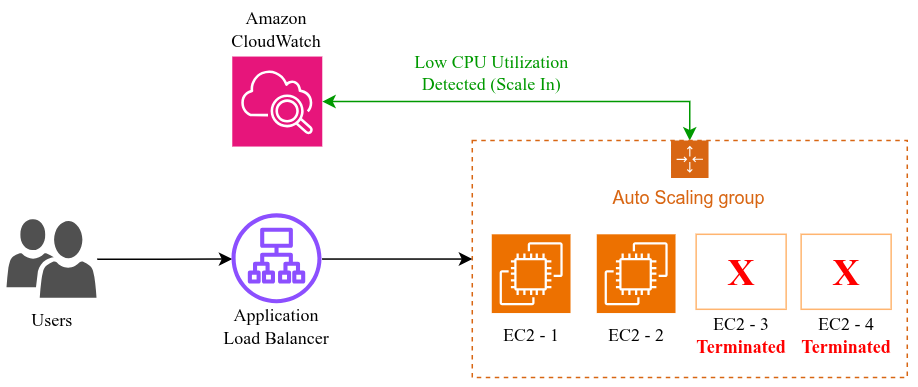
Conclusion
If you are building an application on AWS, Load Balancer and Auto Scaling Group are two services you should definitely understand. A Load Balancer distributes incoming traffic across healthy EC2 instances, while an Auto Scaling Group automatically adds or removes instances as the application load changes.
When these two services work together, your application can handle sudden traffic increases, recover from instance failures, and scale as your users grow. It also helps you avoid running unnecessary EC2 instances when traffic is low, which can help control AWS costs.
For anyone learning AWS, Cloud Computing, DevOps or Cloud Engineering understanding how Load Balancing and Auto Scaling work together is a great starting point for designing highly available and scalable applications.