September 9, 2026
Understanding Amazon Route 53 | Essential AWS DNS Concepts Explained
Amazon Route 53 is one of the most important AWS services to understand if you are learning cloud computing, DevOps or AWS infrastructure.
Whenever you type a website address such as example.com into your browser, something needs to translate that human-readable domain name into an IP address or another destination. That process is handled by DNS (Domain Name System).
Route 53 can do much more than simply connect a domain name to an IP address. It can route traffic based on latency, geographic location, weights and application health. It can also work closely with services such as Amazon EC2, Elastic Load Balancing, CloudFront, S3 and API Gateway.
In this guide, we will start with the basics of Route 53 and gradually move toward some of the concepts you are likely to encounter when working with real-world AWS architectures.
What is Amazon Route 53?
Amazon Route 53 is a highly available and scalable Domain Name System (DNS) web service provided by AWS. The name Route 53 comes from port 53, which is the standard port used by DNS.
For example, imagine that your application is running on an EC2 instance with a public IP address 54.123.45.67. Users could access the application using the IP address, but that is not practical for a real website. Instead, you can associate a domain name with the application:
-> www.example.com → 54.123.45.67
Now users can access the application using a meaningful domain name rather than remembering an IP address. This is the basic job of DNS and Route 53 provides AWS's managed solution for it.
Why Do We Need DNS?
Servers communicate using IP addresses, while humans generally prefer names that are easier to remember. Imagine that you have deployed a website on AWS and your server has the IP address of 18.141.20.50. A user could visit
-> http://18.141.20.50
But what happens if the server is replaced and the IP address changes? You would have to tell your users about the new address. Instead, you can use a domain such as:
-> www.example.com
DNS acts as the connection between the domain name and the destination of your application.
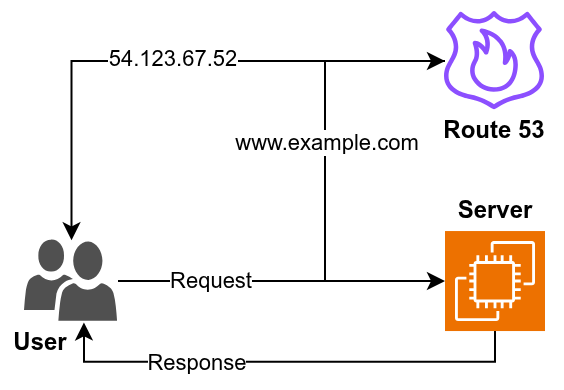
The user does not need to know the underlying IP address. They only need to remember the domain name. This is one of the fundamental reasons DNS is so important on the internet.
How Does DNS Resolution Work?
To understand Route 53 properly, it helps to have a basic idea of what happens when someone enters a domain name into a browser. Suppose a user enters
-> www.example.com
The browser needs to find the destination associated with that domain. A DNS resolver performs the necessary lookups and eventually reaches the authoritative DNS server responsible for the domain.
A simplified DNS resolution process looks like this
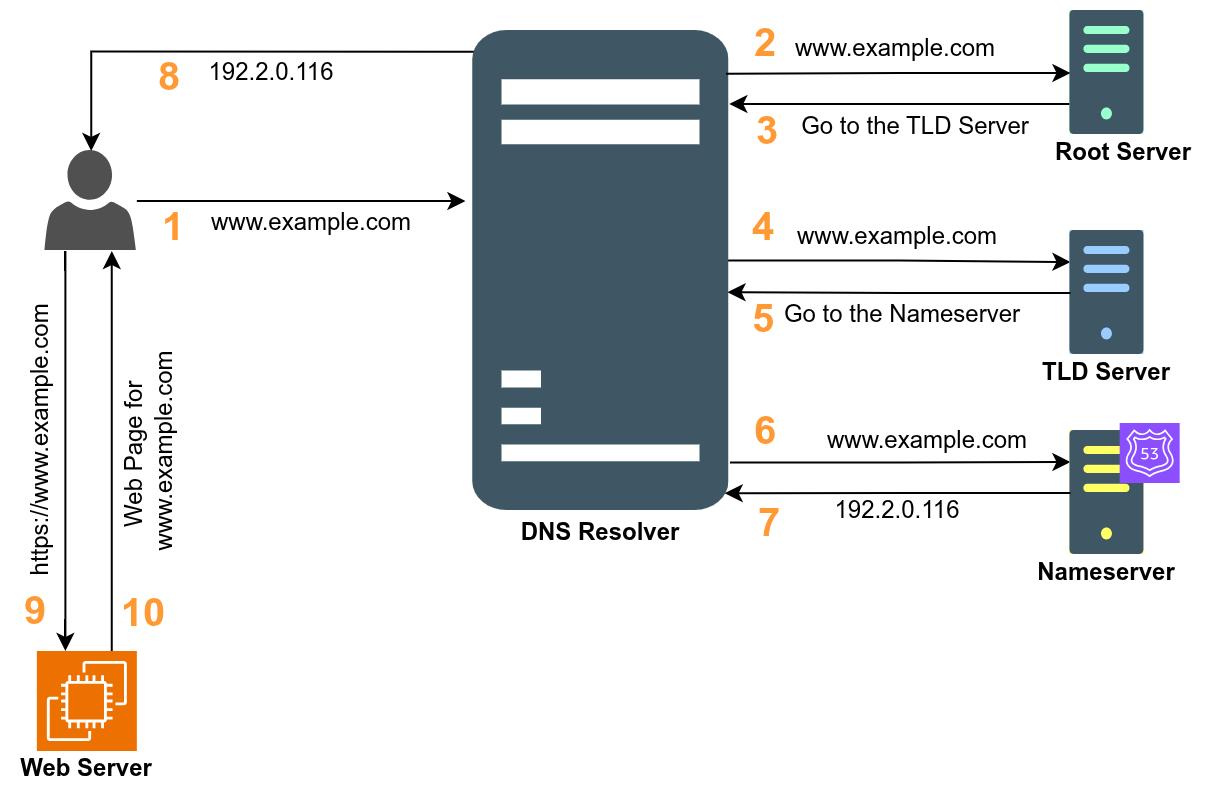
This is a simplified representation because DNS resolvers use caching to avoid performing the complete lookup every time. For example, if a resolver already has a cached answer for example.com, it can return the cached result instead of starting the entire process again. This caching behavior is closely related to another important DNS concept called TTL, which we will discuss later.
What is a Route 53 Hosted Zone?
A hosted zone is a container for managing DNS records for a domain. Suppose you own example.com. You can create a hosted zone for the domain (example.com). Inside that hosted zone, you can create records for different parts of your domain like
example.com
www.example.com
api.example.com
mail.example.com
You can think of the hosted zone as the place where Route 53 stores the DNS configuration for your domain.
A simplified structure looks like this
Hosted Zone
└── example.com
    ├── example.com
    ├── www.example.com
    ├── api.example.com
    └── mail.example.com
Route 53 provides two major types of hosted zones.
- Public hosted zone
- Private hosted zone
Public Hosted Zone
A public hosted zone contains DNS records that can be resolved through the public DNS system.
For example, suppose you have a public website:
-> www.example.com
You can create a public hosted zone for example.com and configure DNS records that point users toward your application.
A common AWS architecture might look like this:
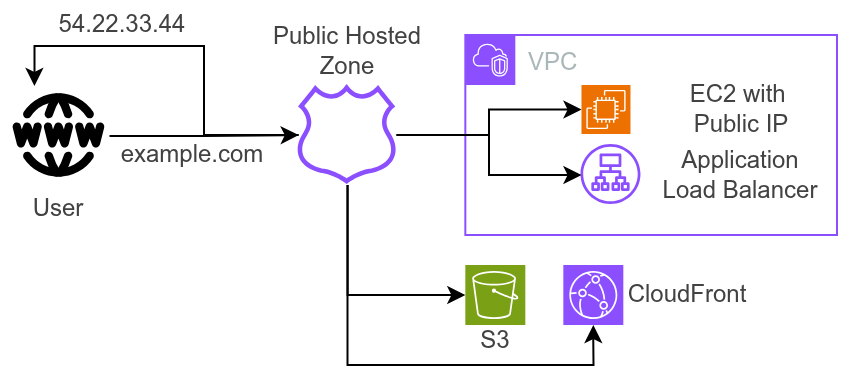
Public hosted zones are commonly used for websites, APIs, public applications and other services that need to be reachable from the internet.
Private Hosted Zone
A private hosted zone is designed for DNS resolution inside an Amazon VPC. Imagine that you have an internal database that should not be directly accessible from the public internet. Instead of using a public domain, you could use an internal DNS name such as
-> db.example.internal
A private hosted zone can allow resources inside your VPC to resolve this name.
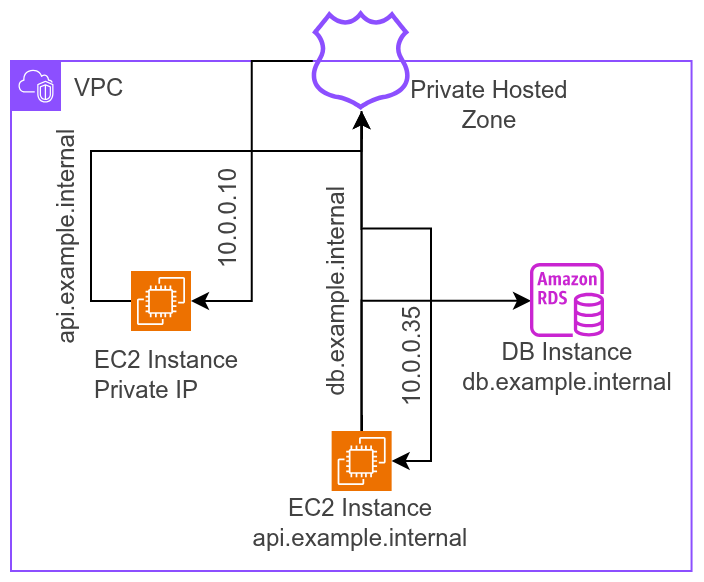
Private hosted zones are useful for internal applications, microservices, databases and communication between services inside AWS environments.
What are DNS Records in Route 53?
DNS records are instructions that tell Route 53 how to handle a domain name. They connect a domain or subdomain to a specific resource, such as an IP address, load balancer or another domain.
An A record can point example.com to an IPv4 address, while an AAAA record points it to an IPv6 address.
A CNAME record maps one domain name to another domain name. For example, www.example.com can point to example.com.
An MX record specifies which mail servers should receive emails for your domain. It is mainly used for email services.
A TXT record stores text information associated with a domain. It is commonly used for domain verification, SPF, and other security-related configurations.
A NS record specifies the authoritative name servers responsible for managing DNS records for a domain or hosted zone.
A SOA record contains important information about the DNS zone, such as the primary name server and zone version information.
Route 53 also supports Alias records, which can point a domain directly to AWS resources such as an Application Load Balancer, CloudFront distribution or S3 website endpoint. This is useful because AWS-managed resources can change their underlying IP addresses. Instead of manually tracking those IP addresses, Route 53 can use the AWS resource itself as the destination of the Alias record.
Domain Registration vs DNS Hosting
This concept that often confuses beginners is the difference between domain registration and DNS hosting. Domain registration means obtaining ownership or control of a domain name through a registrar. DNS hosting means managing the DNS records associated with that domain.
These are two different things. For example, you might register myproject.com with one registrar and use Route 53 to host its DNS records. In that case, you configure the domain's nameservers at the registrar to point to the Route 53 nameservers associated with your hosted zone.
What are Nameservers?
When you create a public hosted zone in Route 53, AWS assigns authoritative nameservers to that hosted zone.
They look similar to
ns-123.awsdns-45.com
ns-678.awsdns-12.net
ns-901.awsdns-34.org
ns-234.awsdns-56.co.uk
These nameservers are responsible for answering DNS queries for your hosted zone. This becomes particularly important when troubleshooting DNS.
You might create a record correctly inside Route 53, but if the domain is still delegated to nameservers belonging to another DNS provider, your Route 53 records won't be authoritative for public DNS queries.
What is TTL in DNS?
TTL (Time To Live) determines how long a DNS record can be cached by DNS resolvers before they need to request the record again.
In Amazon Route 53, TTL is configured for individual DNS records. For example, if you set the TTL to 300 seconds, DNS resolvers can cache that record for 5 minutes.
A lower TTL means DNS changes are picked up faster, but it can result in more DNS queries to Route 53. A higher TTL reduces DNS queries and can improve caching efficiency, but DNS changes may take longer to reach users.
For example, if example.com points to an EC2 instance and you change its IP address, a 300-second TTL means cached resolvers may continue using the old IP for up to about 5 minutes.
In Route 53, a common approach is to use a lower TTL before planned DNS changes and increase it afterward when the record is stable.
A Practical Amazon Route 53 Example
Suppose you have deployed a web application on AWS. Your application has an Application Load Balancer with multiple EC2 instances behind it.
Now, You own the domain as myapp.com. You want users to access your application using https://myapp.com.
You can create a public hosted zone for myapp.com and configure an Alias record that points the domain to your Application Load Balancer.
The final architecture looks like this
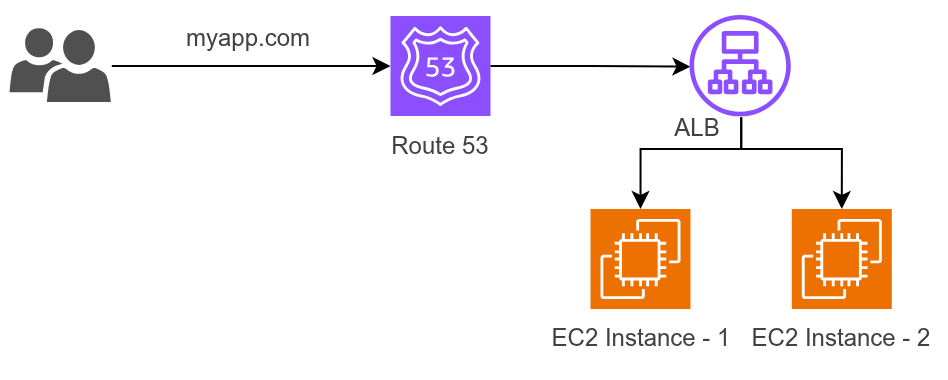
When the user enters myapp.com, DNS resolution takes place through Route 53. The request then reaches the Application Load Balancer, which distributes the application traffic between the healthy backend instances.
This simple architecture introduces several important AWS concepts at the same time like DNS, Route 53, Alias records, load balancing, EC2 and high availability.
Conclusion
Amazon Route 53 can seem complicated when you first start learning DNS because there are several new terms to understand. The good news is that you do not need to learn everything at once.
Start by understanding what DNS does, then learn hosted zones, DNS records, nameservers, Alias records and TTL. Once those concepts make sense, routing policies and health checks become much easier to understand. Hope you understand the topic properly and thanks for reading the blog, in the next post, I will discuss routing policies.